Community

Announcements

Welcome to ArtHelper Announcements, a place for official posts from team ArtHelper. Follow this community to learn about all of the latest things coming soon from ArtHelper!

Posts

📝 Update Notes: Introducing Daily Art Boosts on ArtHelper!

Post image 1

We just updated ArtHelper with a ton of new improvements! Here's a summary of the most impactful updates.

DAILY ART BOOSTS

You'll now find Arty hanging out at the top of your right-hand sidebar with a new offering every single day!

He may have an art-selling tip, some marketing content written just for you, or insights on your collection that you may not have even considered yourself! You'll just have to check in and see.

Enjoy a new boost EVERY DAY! 🎉

SIMPLIFIED POST CREATION

It's now easier than ever to post in the Community!

Our new post creation tool is simpler, cleaner, and no longer requires a post title. Just share your topic, question, or art and click post!

Pro tip: Want all the old, advanced formatting options back? Just click the "Format" button and they'll show back up!

MORE IMPROVEMENTS

  • View counts added to posts and comments

  • Chats with Arty can now open as a slide-out within the Community rather than taking you to a different section of the platform

  • Improved spam detection in DMs and comments

  • Smarter "suggested connections" – build your creative network!

  • In the left-hand sidebar, a red "notification" dot will now appear on a Community you've joined whenever there are new posts to view in that Community.

  • Many bug fixes and performance improvements

We're already hard at work on the next update! Have something you want to see added to ArtHelper? Post here to let us know!

Posted 2d ago in Announcements
1

[Update Notes] "My Communities" Sidebar + Reputation Leaderboard!

The latest platform update to ArtHelper just landed and it's packed with highly-requested features and improvements!

FEATURED ENHANCEMENTS

  • Added "My Communities" section to the left-hand sidebar. Easily return to your joined Communities by browsing this handy new list found on the left-hand sidebar!

  • Added a Reputation leaderboard. See who has the most Reputation and track your climb to the top!

  • Added "Suggested Connections" widget to the right-hand sidebar. Discover artists you may want to connect with. Suggestions are driven by factors such as subject matter, style, and geographic location.

  • Enhanced the search bar with autocomplete. Find conversations, Communities, and people more easily.

  • Relocated the "Join Community" button for better visibility. Be sure to join Communities that reflect your interests! You'll see all the best content on your homepage feed.

BUG FIXES

  • Prevented comment re-ordering after upvote

  • Fixed broken YouTube embed on translated posts

  • Fixed folder deletion issue causing orphaned images

Posted 1mo ago in Announcements
30

[Update Notes] Introducing the Referral Program + Improved Feeds!

Post image 1
Post image 2
1/2

The latest platform update to ArtHelper just landed and it's packed with highly-requested features and improvements!

FEATURED ENHANCEMENTS

  • Improved Trending Feed algorithm. You'll now more easily discover content you care about in your Trending Feed! We've tweaked our algorithms to give content from Communities you have joined an extra boost.

    Want to curate your experience? Just join Communities that reflect your interests and the best posts from these Communities will automatically rise to the top of your Trending Feed!

    Click here to view all Communities »

  • Added Referrals to Reputation Points system. You can now earn +100 Reputation Points for every artist you refer to ArtHelper! Visit your Points page to get your unique referral link that will automatically track your referrals.

MORE ENHANCEMENTS

  • Removed character count minimum for Recommendations.

  • Improved direct message (DM) spam protection.

  • Added "Report User" option to DMs and profiles.

  • Added ability to leave DMs and Group Chats.

  • Added emoji support to DMs.

  • Improved AI art detection systems to minimize false positives.

  • Added appeal process for NSFW flagged content.

BUG FIXES

  • Fixed an issue relating to users submitting multiple Human-Made Art verification requests.

  • Fixed ability to upload a custom Community banner.

  • Fixed URL rendering issues in posts/comments.

  • Allow scrolling in onboarding wizard for short/wide screens and zoomed in browsers.

  • Allow language change in onboarding wizard.

  • Fixed copy/paste styling issues in post/comments

Posted 1mo ago in Announcements (edited)
21

[Update Notes] ✨ Introducing Your New Creative Resume

Post image 1
Post image 2
Post image 3
Post image 4
1/4

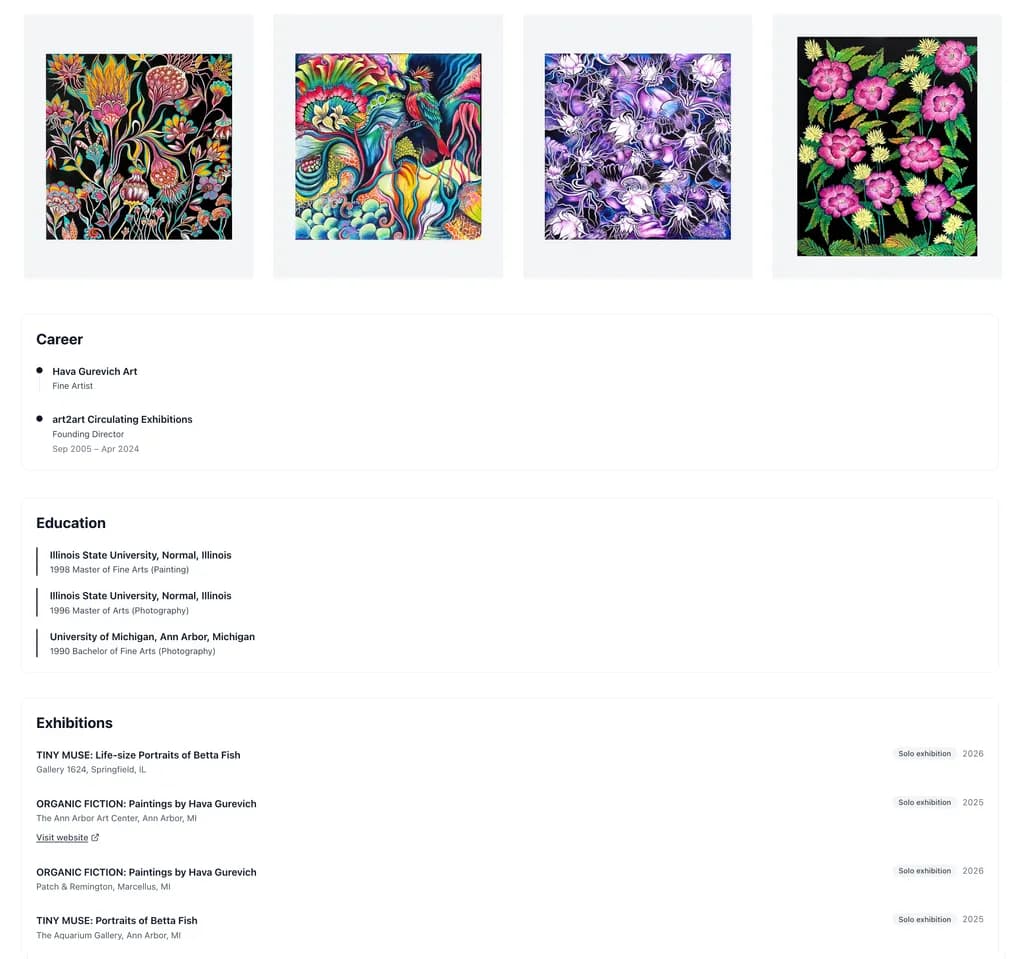
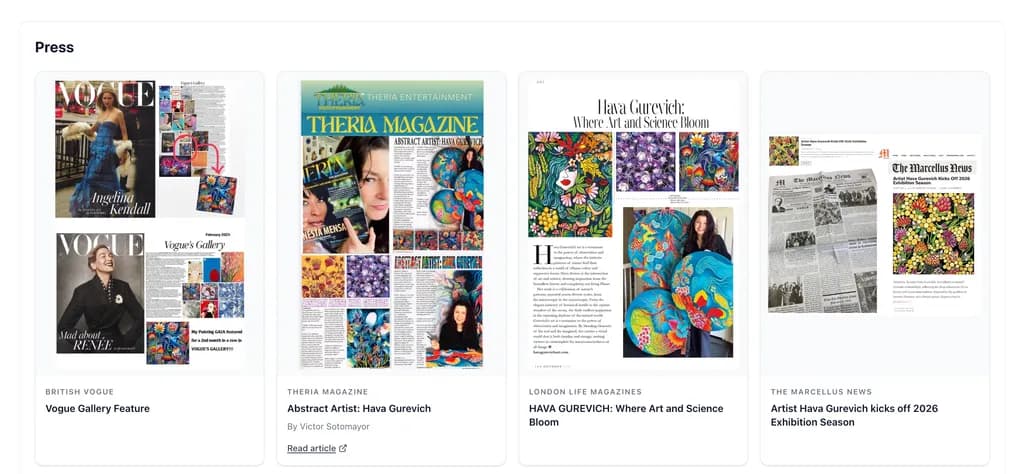
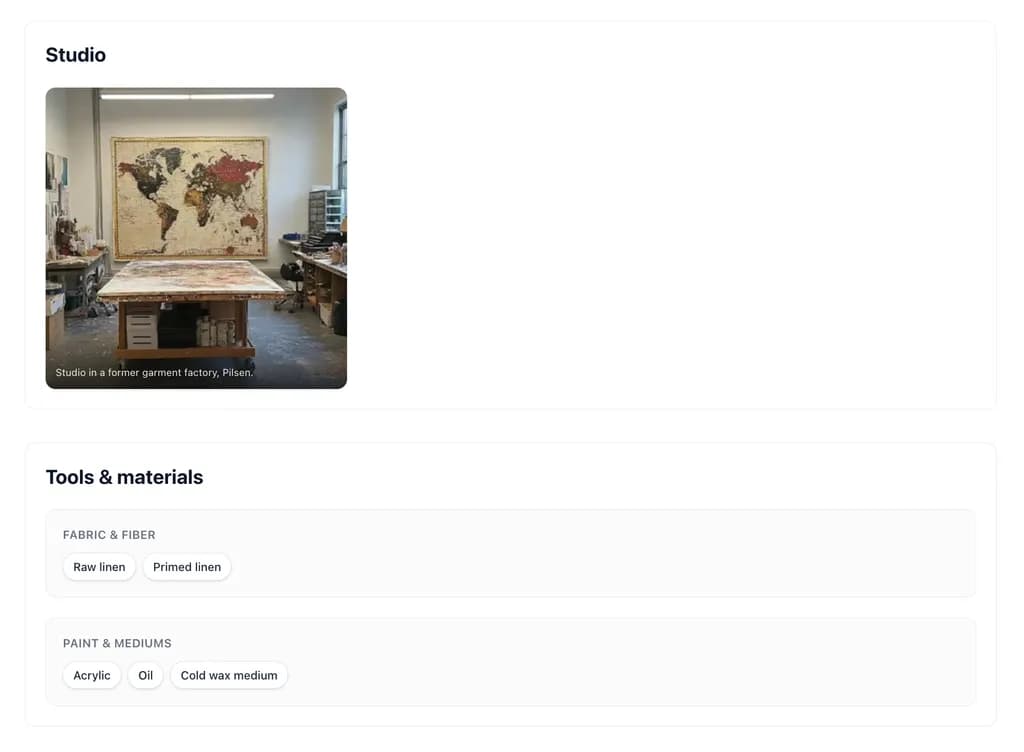
You can now upgrade your artist profile into the ultimate Creative Resume!

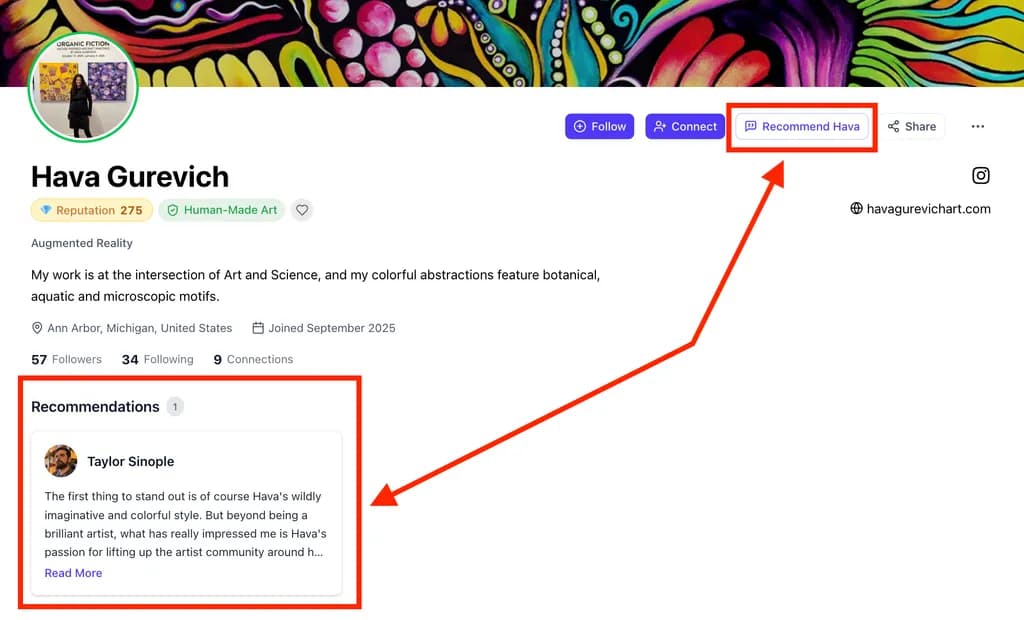
We haven't changed anything about how your profile beautifully displays your artwork, but now, you can add a whole lot more...

👉 Like your creative job history, education, gallery representation, and exhibitions!

👉 Press snippets!

👉 Studio pictures and details on your materials!

👉 PLUS: You can even collect and display professional recommendations from other creatives on ArtHelper!

👉 How To Get Started

To upgrade your profile into a Creative Resume, just visit your profile on ArtHelper and scroll down to below your artwork.

There, you'll find all the new sections – ready for you edit, and even re-order to create your dream Creative Resume!

👉 Why We Built This for You!

ArtHelper Profiles are highly discoverable online.

When a collector, curator, interior designer, or potential collaborator lands on your profile, we want to make sure they see your work in the best possible light and YOU as a credible and professional creator.

These new portfolio additions will do just that – enjoy!

Posted 1mo ago in Announcements
37

[Update Notes] Introducing Reputation Points!

ArtHelper Rep is here!

You've been posting your work, leaving thoughtful comments, and starting the discussions that make this community so valuable to creatives. And starting today, we’re giving back! 

Introducing ArtHelper Reputation Points – Rep, for short. Every time someone engages with something you’ve shared on ArtHelper, you earn points.

Here's how it works:

  • +3 pts when someone comments on your post

  • +2 pts when someone likes your post

  • +1 pt when someone likes your comment

What can you do with your Rep?

Reputation Points can be spent to unlock a wide range of rewards.

A few highlights from our current rewards line-up:

  • A free month of Instagram Growth for your art

  • A free month of ArtHelper Pro

  • A bespoke, gallery-ready portfolio PDF designed by our studio team

  • A one-hour art business consultation

  • A professional redesign of your Instagram account

As your all-time Rep increases, you’ll also unlock increasingly exclusive reputation badges to show off your status in the community! These are based on your all-time Rep earned, regardless of how much you have spent unlocking rewards. 

See your Rep balance and the full rewards catalog

Reward redemptions open soon! For now, every point you earn is already banking.

👉👉 My question for you: What Reward should we add next?

Posted 2mo ago in Announcements
74

[Update Notes] Multi-language support, improved AI detection, and more!

Post image 1

ArtHelper is going global! Our latest update lays the groundwork for artists EVERYWHERE to create and connect in one place.

New Features & Functionality

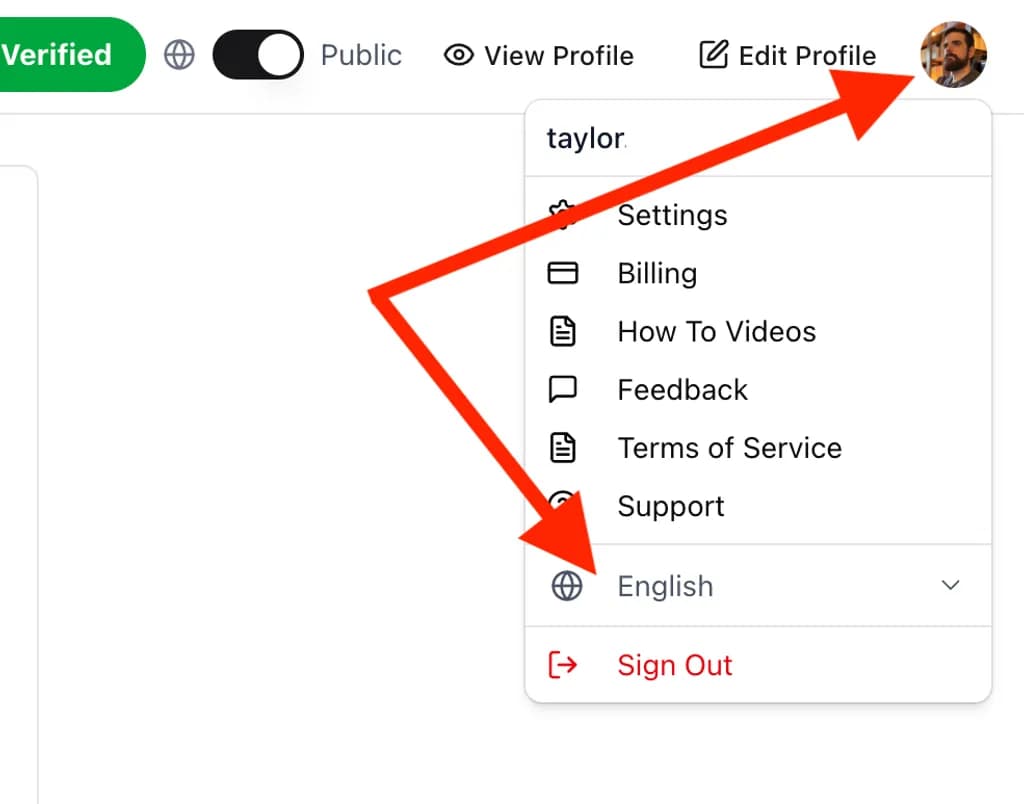
  • Multi-language support. The entire platform, including all posts and comments, can now be translated to English, Spanish, German, French, and Portuguese. Access language settings by clicking your profile picture on the top right of ArtHelper.


  • Improved AI detection. We've sharpened our content detection systems so the work you see here is even more reliably made by human hands, but this process will never be perfect! If you see something that doesn't look authentic, use the Report tool to let us know. There is an option for "AI content". Working together as a community is what will make this the best and most human community on the internet.

  • "Trending" feed improvements. Fresh posts will now surface faster on your Trending feed!

  • "New" feed added. Added a new option to sort the feed by "New" to view all content in chronological order.

  • Additional notification types added. You'll now receive a notification if one of your posts makes it into the top 10 on the Trending feed! We'll also let you know when someone you follow has created a new post.

  • Added easy "follow back" option. When someone follows you, you'll be able to follow them back right from the notification without having to navigate to their profile first.

Bug Fixes

  • Fixed a caching issue that was delaying how soon you can view your Profile after updating it.

What should we work on next? Let us know in the official Feature Requests Community.

And stay tuned for many more updates – we're just. getting. started. 💪

Posted 4mo ago in Announcements
15

[Update Notes] v4.2.6 featuring Hashtags, Image Commenting, and more!

The latest platform update to ArtHelper just landed and it's packed with highly-requested features and improvements!

New Features & Functionality

  • Added hashtag support. You can now add hashtags to your posts and comments to make them more discoverable. Hashtags are also clickable, allowing you to browse by tag and explore relevant content posted across ALL Communities!

  • Added YouTube support. Use the new "video" icon when creating a post to share a YouTube video in your post!

  • Added emoji support. Express yourself beyond words! 😄

  • Added at-mentions. Tag a fellow member with @theirname and they'll get notified. Great for bringing someone into a conversation or giving credit where it's due.

  • You can now edit and/or delete your posts. Changed your mind? Missed a typo? You're now in control of your posts after they go live.

  • Images can now be uploaded in comments. So you can finally show AND tell!

Interface Enhancements

  • Clearer notification text for Comment Replies. It's now easier to see at a glance when someone has replied directly to one of your comments, not just a post you're following.

  • Added Trending Hashtags to sidebar. See what the community is talking about right now.

Bug Fixes

  • Fixed crash related to searching your Saved Content

What should we work on next? Let us know in the official Feature Requests Community.

And stay tuned for many more updates – we're just. getting. started. 💪

Posted 4mo ago in Announcements (edited)
22

[Update Notes] v4.1.38 featuring Feed Tabs, Bookmarking, and more!

Hey ArtHelpers! Today's update is packed with user interface enhancements designed to help you get to the content that interests you more quickly.

Thank you for making our launch week so much fun with hundreds of posts and comments shared and dozens of Communities launched!

Interface Enhancements

  • Merged the "Home" and "Community" sections into one feed to simplify your experience

  • Added "New Post" button to the Community feed that allows you to post into any Community right from the homepage!

  • Added Feed tabs (Trending/My Communities/Following/Verified) to Community page to allow you to filter the feed

  • Moved the "My Communities" sidebar to the top of the page to help you access the Communities you have joined more quickly

  • Clicking on a post (or the comment button) will now open the post in an overlay rather than taking you to a new page

  • Added new "What is ArtHelper?" page to the navigation menu that summarizes the Human-Made mission and our platform guidelines

  • Added the ability to bookmark posts

    • View your bookmarked posts on your Saved Content page

  • Updated the "All Communities" Page

    • Added filter/sort (default sort by Popularity)

    • Added gradient background for communities that do not have a custom banner image

  • Added quick follow buttons to Top Contributors card in the sidebar

What should we work on next? Let us know in the official Feature Requests Community: https://www.arthelper.com/community/townsquarefeaturerequests

Stay tuned for many more updates to come – we're just getting started. 💪

Posted 5mo ago in Announcements (edited)
13

Introducing the Community Update – Create YOUR OWN Communities on ArtHelper

Post image 1

Build Your Creative World, Your Way.

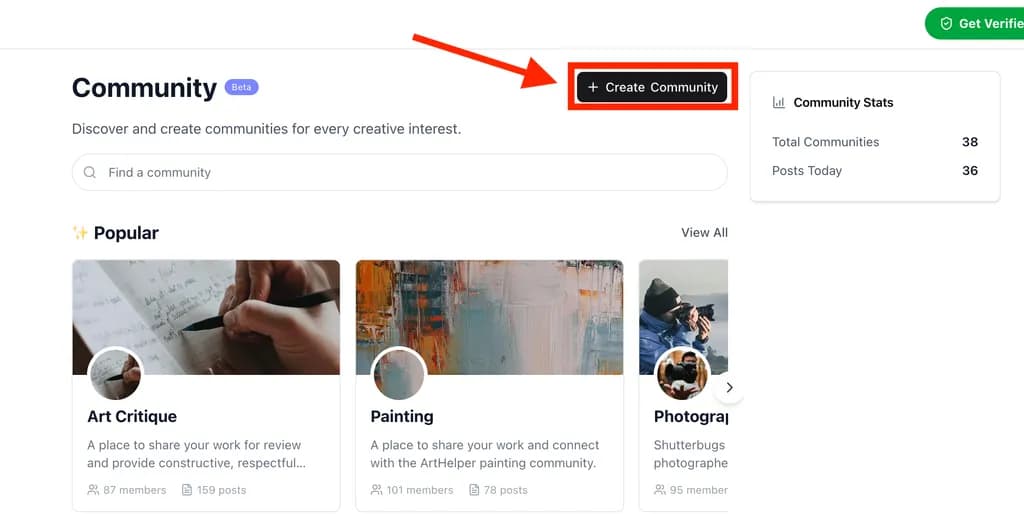
Starting today, any ArtHelper user can create a Community around any creative topic – from techniques and niches, to hobbies and interests!

Communities can be set to public to open the conversation to the global art world (from creators to consumers), or private to run close collaborations, local clubs, or even paid classes.

Community creators will be fully-empowered moderators of their Community – customizing the appearance of their Community page, choosing the posting rules, and maintaining any daily or weekly threads they feel will engage their Community participants. Additional moderators can be added at any time to share the reins!

Artists have always built their own worlds. The Community Update is about bringing that spirit of creation to the ArtHelper platform. Enjoy!

Additional updates featured in this release:

  • Added support for Founding Member badges (being awarded to all Human-Made verified users through 3/15).

  • Popular communities section is now horizontally scrollable, showing up to 20 communities

  • Updated the "View Communities" page layout to allow better viewing/searching

  • Updated “Human-Made Art Only” toggle label to “Verified Human-Made Art Only” on art/artists pages

  • Fixed a bug that was not properly displaying private profiles

  • Added a more visible "Follow" button on posts

Posted 5mo ago in Announcements
20