General

BIG UPDATE to Mockups App -- Significant Improvements

Hey All - we just made a big update to the Mockups app, and we want you testing it. Here's what's new:

  • a new Create Mockup page, where you hang your own art on a wall, at its true size

  • thousands of new rooms for homes and businesses, and you can see your art in 8 rooms with one tap

  • try your art in different frames and mats

  • upload a photo of your own room, or describe a room and we'll make it

  • download it sized for Instagram, Reels or Etsy, or share it to social media

  • save your mockups and come back to them exactly as you left them

To try it, go here (use your arthelper login, as usual) - https://mockups.arthelper.com/create

Your automatic room mockups are here - https://mockups.arthelper.com/

Video tutorials for all of it are here - https://mockups.arthelper.com/tutorials

When you make a mockup, your artwork is never sent to an AI image generator, and it is never redrawn.

THIS IS BRAND NEW, AND IT COULD BE BUGGY, AND THAT'S WHY WE NEED YOUR FEEDBACK SO WE CAN MAKE IT ROBUST.

PLEASE DROP YOUR FEEDBACK, SUGGESTIONS, or any BUGS you encounter BELOW IN THE COMMENTS.

AND TELL US YOUR FEATURE REQUESTS. WHAT WOULD MAKE THIS AMAZING? WE ARE ALL EARS.
Posted in General (edited)
87

118 Comments

Sort by:
Greg JewellNov 7, 2026

This is a great addition to ArtHelper! I have been using Smartist for mockups. A couple additional features that would be helpful: 1) ability to change thickness and color of the frame and 2) to customize matte size (top, sides, and bottom) and matte color, and 3) ability to change the wall color for a selected room. Apologies if I missed those, but if those would be available here, I would end my Smartist subscription for sure. Thank you!

8
Nick FriendNov 7, 2026

Done, Greg, and thank you! All three are in now. Under Frame you can change the frame's thickness and color, and set the mat's size and color, including top, sides and bottom separately. Under Room, Wall color repaints the wall of the room you've chosen, in a color we offer or your own. We'd love for this to be all you need: is there anything else you like about Smartist that we don't have yet?

0
Greg JewellNov 7, 2026

Thank you Nick! I will play with it some more and respond back on this thread. Thanks again!

1
Nick FriendNov 9, 2026

No rush at all. Whenever you've had a play, I'd love to hear how it stacks up against Smartist.

0
Nick FriendNov 11, 2026

A few more things went in since, from the list of what Smartist does: saved frames you can reuse on any piece, clear and float-mount mats, wall textures like brick and wood, and an angled view of the room. No need to reply, just thought you'd want to know when you get a chance to play.

1
Trevor HirstNov 8, 2026

Abstract art has one main difference to realism in that quite often the art can be viewed and displayed in either format, vertical or horizontal. One feature missing in all room mockup generators is the facility to switch an art's format. The only option at the moment is to upload two versions of the same artwork, which is wasteful and time consuming. Adding this feature would be a major advantage over all other mockup generators.

7
Nick FriendNov 9, 2026

Great catch about abstracts. Under Art there's now Turn it 90°, which flips a piece between vertical and horizontal at its real size. No second upload.

0
TOM ANGNov 9, 2026

You're too good!

1
Nick FriendNov 9, 2026

It's your sharp eyes doing the work, Tom. Did that faint grid go away after a reload?

0
David GreenNov 8, 2026

Im a marble sculptor and a room mockup tool wiould be great. Showing it in a frame at different sizes in different rooms is useless for unique sculptures

6
Nick FriendNov 9, 2026

You were right about frames, David, so we fixed it. Under Art, tap Cut out the background, then tap your sculpture and it lifts right out of the photo. Room, Browse all, Sculpture gets you pedestals, tables and garden plinths. The photo never leaves your computer. I'd love to see your marble in there.

1
Sherri NordhausNov 8, 2026

Just wondering how this is affected if we don't put in a size because we want to sell a variety of print sizes? Or is this feature just for originals?

5
Nick FriendNov 9, 2026

Not just originals, and you don't need a size on file. Pick 12, 24, 30 or 36 inches, or type any size, and it only changes that one mockup. So you can show the same piece at each print size you sell.

1
Sherri NordhausNov 9, 2026

Awesome! Looking forward to trying it- thank you Nick!

1
Nick FriendNov 9, 2026

Let me know how it goes, Sherri. And if you hit a size that gives you trouble, tell me.

1
Sherri NordhausNov 9, 2026

OMG - This is stunning! What a great app! I just made a 6 second video of my latest sunset marsh is a room and it's perfect! I'll have to take time to figure out how to describe a room soon. Thank you Nick!!

1
Nick FriendNov 9, 2026

A sunset marsh is a lovely one to try it with, Sherri. When you get to Describe a room, just type it the way you'd say it, like a cozy reading corner with a green wall. What would you like it to do next?

0
Cynthia Ann Wild Heart StudioNov 7, 2026

We still need smaller room/wall set up's. If a painting is 9x12 all of these set rooms are too big. I'd show it larger for a print they can order, but the originals need different spaces.

5
Nick FriendNov 9, 2026

We heard you on the 9x12s. There's a Small art button in the room picker now, with close-ups on nightstands, shelves, mantels and tabletops. On a tabletop or shelf the piece stands right on the surface.

0
A Thyme for Art™Nov 6, 2026

Finally! Can't wait to try it once I'm fully recovered.

3
Nick FriendNov 6, 2026

Thank you, and I hope you feel better soon! When you're ready to try it, tell us what you think. And if there's a feature or an improvement you'd like to see, we're all ears.

1
TOM ANGNov 7, 2026

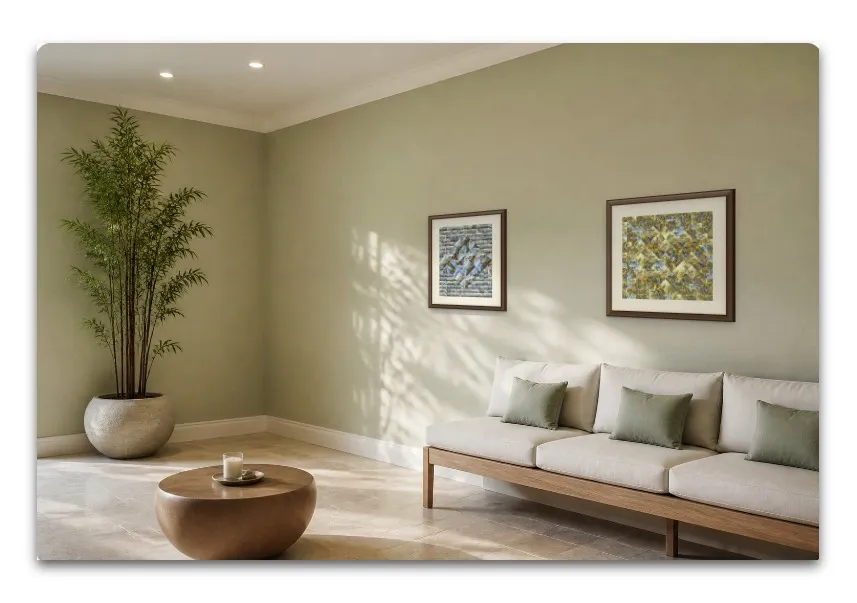
Well done, team! I'm going to have some fun with this as I love making room mockups. I already use AI to make new rooms, but this is going to be much easier!
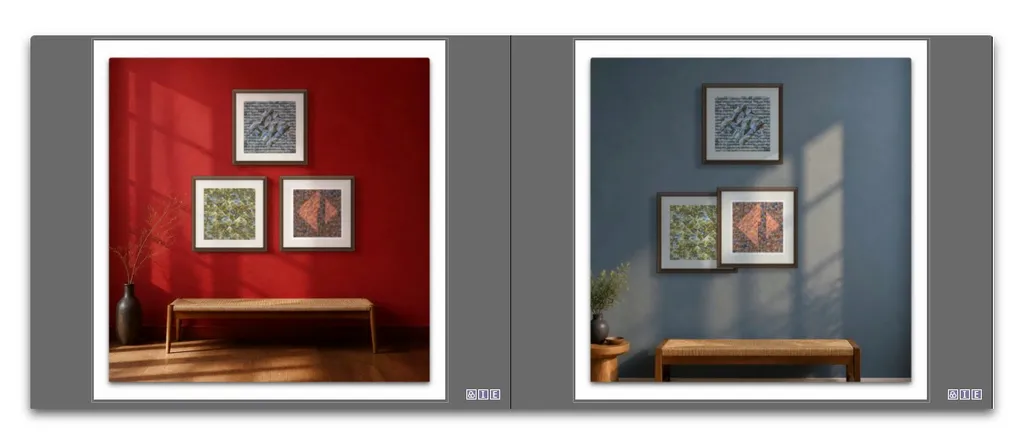
One request: where there are two or more works on the wall, could the room options hold their relative positions as much as possible? E.g. brown wall as arranged, blue option re-arranged.

2
Nick FriendNov 7, 2026

Done, Tom! Your pieces now keep their positions when you switch rooms, and See it in 8 rooms shows the whole group too. Thanks for catching that, and for helping Jon and Cecil. What should we add next?

0
TOM ANGNov 8, 2026

My pleasure! I'm learning too.
A few things:
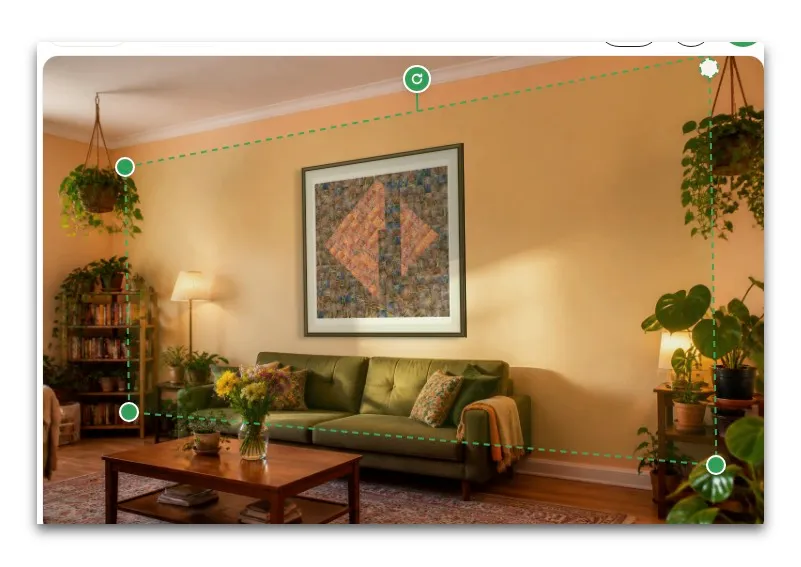
- when we call 'Edit wall' on rooms that have one corner out of shot, one top control handle falls outside the image. When bringing it in, that action pulls the rest of the wall around.


Could be fixed by allowing the whole distort frame to move, carrying the artwork. Not a biggie as it's easy enough to work around, but it's still a work around.
Also in Edit wall: changing the wall width while artwork is in place has effect of changing artwork size, not the wall. I guess you were actually to change the wall, it'd count as a new generation.
Tone curve: as a default, I'd look at slightly brighter rooms with more open shadows. My screen G2.2, D6000.

1
TOM ANGNov 8, 2026

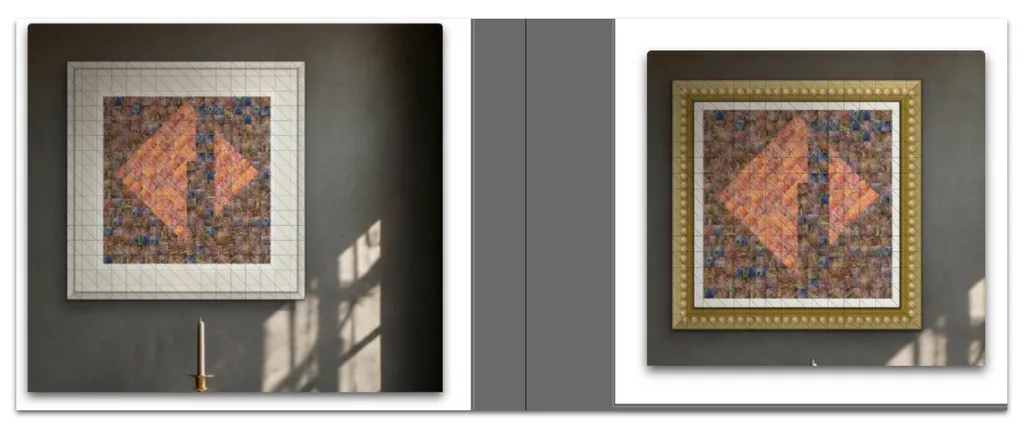
My downloads have a faint orthogonal grid overlaid? Happens with any frame.

0
Nick FriendNov 9, 2026

That picture helped a lot, Tom. We've changed how downloads are drawn. Could you reload the page, download again, and tell me if you still see it?

0
Nick FriendNov 9, 2026

All good catches. Corners now move only as far as you drag them, and there's a middle handle that moves the whole wall with the art on it. You read Wall width right: it sets the room's real size, so art looks smaller on a wider wall. Brighter default rooms is a fair note and we're looking at it.

1
Jon BerndtNov 6, 2026

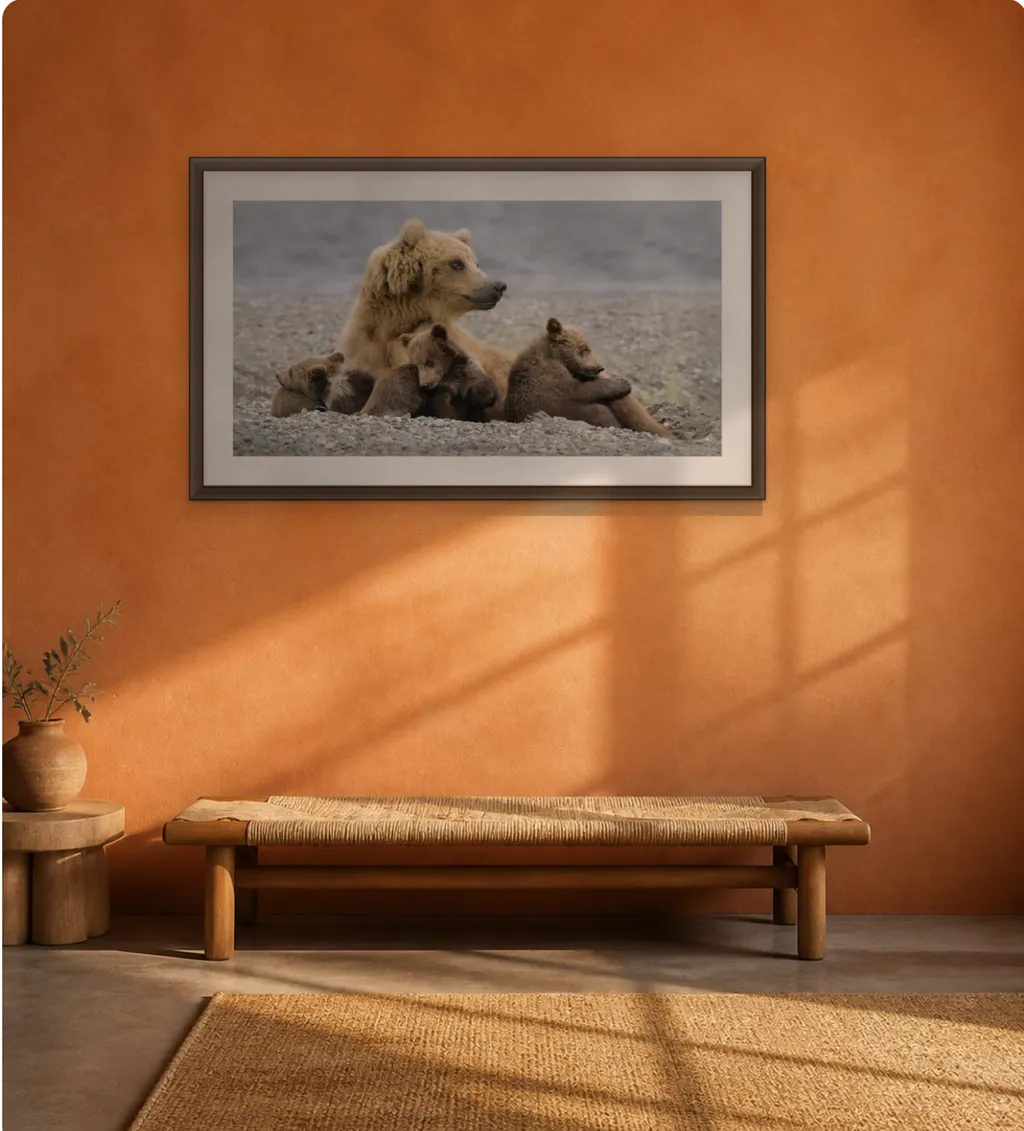
Excellent. I tried this out and it's so much better than before. I do have a few comments. See the attached image.

1) I like that the framed photo realistically accounts for the sunlight/shadow coming in from the window. However, the shadow under the framed photograph on the wall isn't consistent with that angle; it goes straight down from the photo. Suggest making the shadow configurable.
2) It would be nice if, when dragging the picture boundary points to resize the photograph, dimensions were shown as the resizing takes place.
3) The framed photograph seems darker than it should be. Could the artist adjust the photograph's brightness/exposure?

2
Nick FriendNov 6, 2026

Thanks Jon, this is great feedback. You can now see the size live while you drag a corner. Art is also brighter by default now, and there's a new Brightness control in the Art tool so you can set it yourself. The shadow can be moved left or right under Frame > Shadow falls, and we're working on making it follow the sun automatically.

1
Jon BerndtNov 7, 2026

Wow! I saw your latest update, but it looks like I can only reply to this earlier one.

I appreciate the quick response time!

I can't wait to try this out - probably won't have time until tomorrow.

So, since you asked if there was anything else: I feel like I'm getting greedy to ask this, but is there a way that a video could be made using this tool, presenting a "walk-by" of a piece of art on the wall? That might be good for an Instagram reel.

1
Nick FriendNov 6, 2026

Update Jon: the shadow now follows the sun in the sunlit rooms, along the window lines on the wall, so it falls the way the light does. Thanks again for catching that.

2
Jon BerndtNov 6, 2026

That was quick! Looks great!

I think this is already very usable. But two more things - and I would not consider these a high priority or a near-term need, though these would be nice to have at some point:

1) If the shadow under the photo could be made a little more diffuse, that would be great. Right now, the shadow under the photo has a sharp-ish outline.

2) It would be nice, someday, to have room mockups that featured an oblique view rather than always straight-on and orthogonal.

1
TOM ANGNov 7, 2026

Click on the lozenge 'Describe a room' above the thumbnails and ask for wall at an angle. I get angled views even when I don't ask.

1
Mary Planding | Ocean Artist & AdvocateNov 13, 2026

Ya blew me away Nick! Yowza! Hurrah!!! Now when you integrate it with the ASF CMS so we get these on our websites you’ll have pulled off a miracle !

1
Nick FriendNov 13, 2026

Thank you, Mary. You can download a mockup and add it to that artwork's photos on your website.

0
MykäelaNov 10, 2026

Awesome, Nick! It is time to play around. Thank you 😃

1
Nick FriendNov 11, 2026

Enjoy it, Michelle. Once you've tried a few rooms, tell me what you'd like added next, and if anything trips you up, post it here.

0
Russell FennickNov 10, 2026

OK, I just did a quick something.....

I noticed for instance on the bedroom, the vertical center lines give the impression the room is much bigger than the actually mock up that is shown.

Perhaps the center lines should be oriented to what is seen on screen, not the entire rest of the room that is not seen.

Basically, if half the bed is shown, then the center lines should not be over the entire bed, but dissect the scene in half. That makes the assumption that the space for the art is located in what is shown on screen.

1
Nick FriendNov 10, 2026

Good catch on the bedroom. It's fixed: the center line now marks the middle of the picture you see, not the middle of the whole bed, so a piece dragged to the line splits the scene in half. Center on wall still puts it back over the bed. Would you try that bedroom again and tell me if the line sits where you expect?

0
Russell FennickNov 11, 2026

Yes, that fixes the bedroom center line...now another issues I see. Related to what I posted above with the room and wall edges, in the rooms that have a wall corner, I am able to move my art over the corner of the wall, or over a window or door on the adjacent wall.

The wall edge should be the corners of the room, not the sides of the display. You have the floor designated in some, but not all. But really the floor should not be the lower limit, it should be the counter top, or sofa top, or top of the cabinet, and likewise, the ceiling should be off limits.

I guess, what I am saying, is that the placement of the art should only be allowed in the useable space, notwithstanding the option to be in front or behind furniture, plants or other objects in the foreground, but not on top of a ceiling beam or heater duct.

Maybe I am too picky on this as I am not sure how many folks use this as a concrete method to show their art. Hopefully nobody would attempt to place their artwork on a corner, covering a door or on a ceiling beam, but it is noticeable on larger photos or placing multiple photos on a wall, especially walls with an opening behind them.

1
Nick FriendNov 12, 2026

You were right, Russell. When you drag a piece now, it stops at the room's corners, at doors and windows on the next wall, at beams and at the ceiling, and it can still go behind furniture.

1
Russell FennickNov 14, 2026

Great. However, I randomly went through a few of the rooms and there is still issues with a few of them.

The slate blue nook has the top of the wall way above with is seen. I can slide my art so far up that it disappears.

The empty studio and most of the living rooms have no defined edges within the room. It still goes to the edge of the display overlapping the corner, door, floor and window.

Now, in the room called Bright Minimal, you have another issue related to everything above. There is an inset with a plant in it and a hanging light seemingly in the foreground.

It has all of the "problem" elements with wall edges, corners, display sides and foreground/background transparency. I might want my photo on the wall to the left of the inset, or inside the inset behind the plant and light, but certainly not overlapping the corner of the inset.

Sorry, it's in my nature to notice things like this.

0
Russell FennickNov 10, 2026

I only briefly had a chance to try it. The edges were the first thing I noticed. Thank you for correcting that issue. I will experiment with it more a little later on.

1
Nick FriendNov 10, 2026

Thank you, Russell, I'm glad the edges look right now. When you've had more time with it, tell me what else you notice.

0
Sharon BethNov 10, 2026

All of my images have a white border around them in the rooms, I don't know how to change it and I never put those borders there. Can this be part of the improvements?

1
Nick FriendNov 10, 2026

Sharon, thank you for catching this. Your artwork has no border at all. Some of our room photos have a frame and white mat built into them, and that's what you were seeing. It's fixed: on Auto-Mockups, tap No frame above the rooms and you'll only see rooms that show your art exactly as it is. Frame, no mat gives you framed rooms without the white border. Would you try it on your new pieces and tell me if it looks right?

0
Marshlight PhotographyNov 9, 2026

Im excited to try the new mockups. Got a rotten cold and cant type without picking up a kleenex! I don’t have time for this. OK. I vented!

1
Nick FriendNov 10, 2026

Jane, sorry you're stuck with a cold. Vent away. The mockups will be right here when you're feeling better, so no rush. When you do try them, I'd love to hear what you think, and if anything is confusing, tell me here.

0
Maria PoroyNov 9, 2026

I love the decor color swatches that pop up!

1
Nick FriendNov 9, 2026

Glad you found those, Maria. They come from the colors in your own art, so the wall can match the piece. Is there anything else you'd like to change in the room?

0
Debbie LucasNov 9, 2026

I just saw this and was playing around with Mockups. Is there a feature to allow snapping/dynamic alignment guides? Also, I would like to choose multiple images for hanging on a wall. Is this currently available? Thank you.

1
Nick FriendNov 9, 2026

Snapping is in now, Debbie. Drag a piece and it catches the middle of the wall and lines up with your other pieces, with a thin guide showing you where. For several images, go to Art and tap Add another artwork, then try Hang as a set or Line up. How does it feel when you try it? I'd love to know what's still awkward.

0
TOM ANGNov 11, 2026

I was going to ask for snapping but thought 'Nah; that's too much to ask for.' Then you add it. ❤👍

1
Nick FriendNov 12, 2026

Glad we beat you to it, Tom. If it ever catches where it shouldn't, or misses where it should, tell me which room.

0
Russell FennickNov 9, 2026

I tried it and the first issue I had was the room edges are located in the middle of the walls. I wasn't able to move my art or use larger art without being able to move it beyond the wall edges.

1
Nick FriendNov 9, 2026

You were right about those edges, Russell, and thank you for pointing it out. You can now drag your art anywhere in the room photo, and larger pieces can move too. It only stops at the edge of the picture. What else would make it better for you?

0
Marshall KorvelaNov 9, 2026

Wonderful concept. Great to create a wall that allows variation of art work in true size.

1
Nick FriendNov 9, 2026

True size was the part we cared about most, Marshall, so I'm glad that came through. What would you like to see next?

0

Tell me more

1
Nick FriendNov 9, 2026

Happy to, Diane. It puts your art on the wall of a real-looking room at its true size, so people can picture it at home. Upload a piece, pick a room, download the picture. What kind of art do you make?

0
Thomas TribbyNov 8, 2026

This sounds great. I will start using it next week.

1
Nick FriendNov 9, 2026

Perfect. Tell me what you think once you've tried it next week.

0
Lindy Cook SevernsNov 8, 2026

Big thank you for this update!

1
Nick FriendNov 9, 2026

You're very welcome, Lindy. Anything you wish it did?

0
Lindy Cook SevernsNov 9, 2026

still playing with it--

1
Nick FriendNov 9, 2026

Take your time. When something feels off or missing, tell me and we'll look at it.

0
Judy HuckNov 8, 2026

This is an excellent update. Thanks.

1
Nick FriendNov 9, 2026

So glad it's useful.

0
Norman ClarkNov 8, 2026

That's an excellent addition to Arthelper. I've been using ArtPlacer for a while.... it's quite pricey! However, they have a feature that enables users to create virtual exhibitions. It's a big ask but maybe something to think about for the future :-)

1
Nick FriendNov 9, 2026

ArtPlacer's pricing is exactly why this is free. And you're in luck on virtual exhibitions, because we've been building those too. Here's an early peek at your own gallery, room by room: https://galleries.arthelper.com/a/normanclarkart It isn't officially out yet, so tell me what you think.

0
Stacey LizetteNov 8, 2026

It would ve nice to set the thickness of a piece. For example, I often use cradled panels that don't require frames. Adding a thickness to the frame less option with an appropriate shadow would make it more realistic. Also, a thin floater frame set of options.

1
Nick FriendNov 8, 2026

Done, Stacey! Under Frame, choose No frame or Wrapped canvas and you'll see a Thickness menu, up to 3 inches, and the shadow follows it. The Floating filter has six floater frames too, and you can make the frame as thin as a quarter inch. What else would help with your panels?

0
Angela AndersonNov 8, 2026

Had a little play with the Mockups app. To be honest I feel the rooms feel soulless and sparce. I have been using another platform for mockups and perhaps I'm too used to the rooms this platform offers. I will keep having a play around.

1
Nick FriendNov 8, 2026

Thank you for trying it, Angela, and for being honest. We're adding warmer, fuller rooms right now. Which platform have you been using, and what do you like about its rooms? We'd love to get those kinds of rooms in here.

0
Nick FriendNov 9, 2026

Good news, Angela: those rooms are in now. Hundreds of fuller ones, with furniture, objects, plants and real sunlight. Open Room and they're the first you'll see. I'd love to know if they feel better to you.

0
Angela AndersonNov 9, 2026

I use Canvy Nick. Their new video tool option is excellent. Love it!

1
Nick FriendNov 9, 2026

Canvy, that's really helpful, Angela. We just added video too: under Download, tap Make a 6-second video. I'd love to know how it compares, and what you like most about theirs.

0
Nick FriendNov 9, 2026

Your note about Canvy's video sent us straight to work, Angela. Under Download there's now Close-ups: the whole room, in close on your art, then back out, and you can add words at the end. Would you try one and tell me how it compares?

0
Amar SinghaNov 8, 2026

Everything is fantastic, and thank you, Nick, for providing such an unmatched mockup tool. I’d like to bring a few issues to your attention:

First, after configuring my mockup, I noticed that when I download the image in portrait size for Instagram, the final file crops out the floor and the lower portion of the furniture that were visible during the setup process.

Additionally, in my second test image, some faint white scratches appeared across the painting, and the floor and lower furniture were once again cut off. I have attached the results below for your review. Thanks again for all the hard work!

:

1
Nick FriendNov 8, 2026

Done, Amar, and thank you for the pictures. They showed us exactly what was wrong. Downloads now keep the floor and furniture, the faint lines across the painting are gone, and when you pick a size the part that will be cut off is shaded first. What else should we add?

1
Amar SinghaNov 9, 2026

Nothing yet. Thank you Nick for your kind attention on the issue😊Have a happy Diwali!

1
Nick FriendNov 9, 2026

Happy Diwali to you and your family, Amar. Once you've had more time with it, I'm all ears.

0
DebNov 8, 2026

Please please please make rooms for smaller art. This type of setting would be great. Thank you!

1
TOM ANGNov 8, 2026

Have you tried the

0
Nick FriendNov 9, 2026

Your three pleases worked, Deb. Tap Small art in the room picker.

1
Nick FriendNov 9, 2026

We went even smaller, Deb. Open Room, tap Browse all, then Tiny art. It's made for pieces around 5 inches, on desks, nightstands, hallway counters, little easels and stacks of books. I'd love to see what you put on one.

1
DebNov 10, 2026

Perfect! I have several 5” original pieces so this’ll be awesome! Thanks!!

1
Nick FriendNov 10, 2026

That's great to hear, Deb. Tiny art is made for 5-inch originals like yours. Once you've placed a few, would you share one here? I'd love to know if the sizes look right on the desks and shelves.

0
Cynthia Ann Wild Heart StudioNov 7, 2026

I am so happy to see this! I'll give a try.

1
Nick FriendNov 9, 2026

Hope you like it! Let me know how it goes.

0
John RobertsNov 7, 2026

Brilliant work xx

1
Nick FriendNov 9, 2026

Appreciate that, John. Made my day.

0
Jody FarmerNov 7, 2026

Is there a way to make sculpture work be on a pedestal or table?

1
Nick FriendNov 9, 2026

Yes, as of today. Under Art, tap Cut out the background and then tap your sculpture. Then Room, Browse all, Sculpture, and you can stand it on a pedestal or table.

0

Love it…..would love it more if one option was black frame with mat.

1
Nick FriendNov 7, 2026

Done, Mark! There's now a Black + mat frame under Frame, and you can change the mat's color and size. If you've used other mockup apps, is there anything you like there that we're missing?

0

Fantastic Nick. Absolutely fantastic.

1

Ooops old man fingers…..wasn’t done. For years I made my own mockups. When you delivered them it saved me hours. Keep on keeping on. Great job. Thank you.

0
Nick FriendNov 9, 2026

Years of making your own, and now it saves you hours. That's exactly why we built it, Mark.

0
ROXSYNov 7, 2026

vorrei capire in lingua italiano

1
Nick FriendNov 7, 2026

Ciao Rosario! Mockups ti mostra la tua arte appesa in una stanza vera, alla sua dimensione reale, ed è gratuito. Per ora è solo in inglese, ma puoi tradurre la pagina con il tuo browser.

0
Sharon McClungNov 7, 2026

Sounds great! Will be trying this out very soon!

1
Nick FriendNov 7, 2026

Thank you Sharon! When you try it, tell us what you think. If there's a feature or improvement you'd like to see, we're all ears.

0
Azel Art ShopNov 7, 2026

nice work , keep improving this. add art gallery mockups also

1
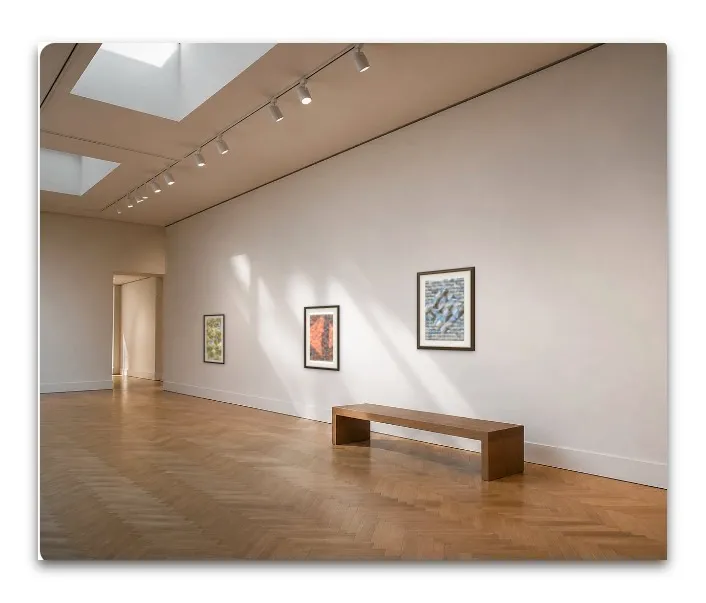
TOM ANGNov 7, 2026

Try asking for a gallery space in the 'Describe a room'. I prompted 'art gallery with skylights and spots in ceiling runners, white walls, parquet floor' and got this (adding my works, which I have arranged yet):

2
Nick FriendNov 7, 2026

Done, Cecil! We have 120 art gallery rooms. On the Room tab, tap Browse all, then Art Gallery. You can also tap Describe a room, then Art gallery, to make your own. If there's anything else you'd like to see, we're all ears.

0
Cammie MarsdenNov 6, 2026

I haven't yet tried the Mock Ups update, but I am super impressed with the responsiveness to Jon's suggestions! Great work!

1
Nick FriendNov 6, 2026

Thank you Cammie! When you get a chance to try it, let us know what you think. And if there's a feature or an improvement you'd like to see, tell us here. We're all ears.

0
Keith MalvernNov 6, 2026

Nick, this is a wonderful tool!

1
Nick FriendNov 6, 2026

Thanks so much Keith! If there's a feature or an improvement that would make it even better for you, tell us here. We're all ears.

0
Greg JewellNov 11, 2026

I noticed many new features today and had a chance to play with it. I created this post for Instagram. I need to kee learning the navigation. One item, probably me, I created it on my phone and downloaded it, but couldn't find the images in my Photos. Really like the additional flexibility! Kudos to the team for moving a warp speed!

0
Nick FriendNov 12, 2026

Not you at all, Greg. On an iPhone a download was landing in the Files app instead of Photos. Now Download shows you the picture: press and hold it, or tap Save to Photos, and it goes straight into Photos.

0
Greg JewellNov 12, 2026

Awesome, I will play with it more this weekend. And, yes, I found the image - all six I downloaded. 😂 Thank you!

1
Karen LoftusNov 11, 2026

Holy cow Nick! Seems like there's more here that when I looked the other day!

I just found the 6-10 second video options from within the Mockups section, and it's so cool! And the fact that it can post to IG is great!

The video option still feels a little buggy though. I keep getting this pop-up: "Your video is still being made — it takes about a minute. It plays in the preview the moment it is ready, and then this will send." It stays in draft mode and I can't Schedule or Post Now.

If I try to back out while that pop-up is visible, I can on Save as Draft of Discard.. Bottomline is I can't get a Draft reel to Post Now or Schedule. It just stays stuck in Draft.

0
Nick FriendNov 12, 2026

Found it, Karen. Your video was being made, but saving the draft with Schedule wiped it, so it waited forever. That's fixed, and your reel in AutoPoster now has its video. Open it in your drafts and you can Schedule or Post Now.

0